How to tell if your film is really loaded
How can I tell if my 35mm film is really loaded? This was a question I used to ask myself regularly, particularly if the film rewind knob didn’t rotate as I wound on, which was often the case.
I used to load a camera, close the back and then wonder whether the film had really engaged properly. The frame counter would advance, but that’s independent of the film transport, so sometimes I would open the camera to check. Inevitably, the film would have loaded perfectly well, and I had just lost several frames, until the time I ignored the lack of rewind knob rotation and got 36 photographs of nothing.
The problem is that the frame (or exposure) counter tells you that you have pulled the camera’s film advance or winding lever. On most manual 35mm cameras it does not tell you that the film has moved.
The reason is straightforward enough. On most manual cameras the frame counter is operated by the camera’s winding lever. It does not measure film passing through the gate. If the leader has failed to engage properly, you can operate the advance lever, cock the shutter and advance the counter without advancing the film.
That means the number of exposures displayed on the counter can climb without a single frame passing through the gate. You can therefore load a film incorrectly, close the back and apparently take 36 photographs. The lever advances, the shutter fires and the counter reaches 36, but the film is sitting in the film cartridge, unexposed. This is about as bad as it gets in film photography.
What should tell you that the film is correctly loaded is movement of the rewind knob or crank, but it may not begin to turn immediately. There can be enough slack in the film inside the cartridge for several advances before that slack begins to turn the cartridge spool.
To address this, I’ve found that if I take up any slack by turning the rewind crank very delicately in the rewind direction, it will turn immediately when I wind on. It is an extra step in the process and needs to be done carefully, but I’ve found it works well.
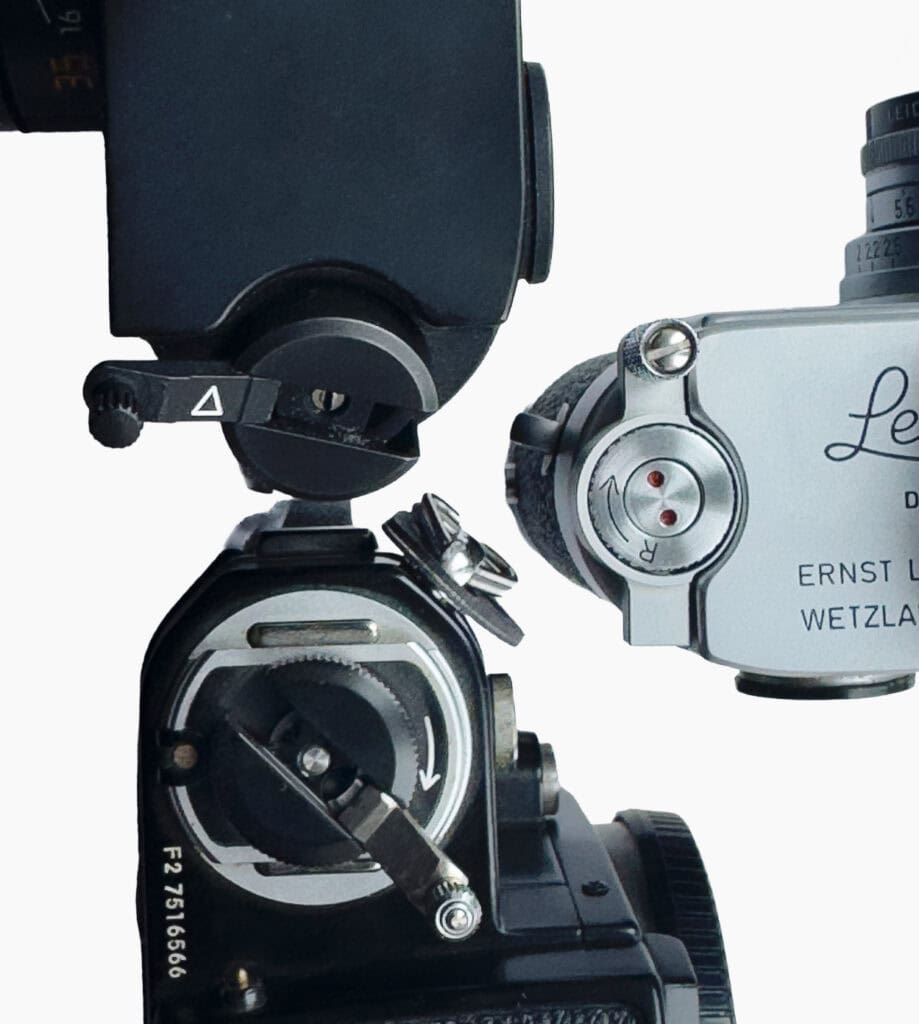
I also wind and fire the shutter twice, with the back open. This lets me watch the frames advancing, see that the sprocket teeth have engaged the perforations, and the leader is being wound onto the take-up spool.
With the back closed, the rewind knob and crank rotate, confirming that the film is being pulled through the camera. I tested this on the Nikon F3 and subsequently applied the method to a couple of other models (Olympus OM-1n and OM-2SP) with the same results.
Loading a 35mm SLR, step by step
These steps are for a conventional manual-loading SLR with a hinged back and a wind-on lever. It does not apply to a bottom-loading rangefinder and should not be applied to a motorised camera.
- Pull up the rewind knob, or flip the back-release latch, to pop the camera back open.
- Drop the 35mm cartridge into the left-hand chamber.
- Push the rewind knob back down so it locks into the cartridge.
- Pull the thin, flat end of the film (the leader) across the open back.
- Insert the tip of the leader into a slot on the right-hand take-up spool.
- Line up the holes along the edge of the film with the small metal teeth, the sprockets.
- Check the film lies straight across the film gate against the guide rails. Do not touch the shutter curtain.
- With the back still open, wind the lever through a full stroke and fire the shutter once or twice. I like to leave the back open to watch the film move, and with two actuations I know there is enough film wound around the take-up spool. One is probably enough, but I’d rather be certain. The take-up spool should turn, the film should travel across, and the teeth should sit in the holes.
- Turn the rewind crank gently in the rewind direction until the slack goes. Do not do this on a camera that loads using a motor as it could damage either the film or the camera.
- Close the back until it clicks shut. The pressure plate on the door is now holding the film flat.
- Advance and fire, and watch the rewind crank. If it turns, the film is moving and the load is good. Carry on until the frame counter reads 1. The frame counter only starts counting once the back is closed.
- If the knob and crank does not turn, the film is not moving.
The rewind control tells me that the film itself is moving and, by taking up the slack first, I can rely on its movement as confirmation.
Open or Closed Back Slack Takeup
Some manufacturers describe exactly this process, which we can refer to as open back slack takeup, in the camera’s manual. This is an extract from the Fujica AX-5:
- Pull out the film tip and insert it deeply into the slot of the Take-up Spool, but make sure it doesn’t go through the spool hub.
- Wind the film with a stroke or two of the Film Advance Lever and make sure the Sprocket Teeth catch the film perforations.
- Erect the Film Rewind Crank and turn it in the direction of the arrow to take up any slack in the film, make sure the film is properly positioned between the guide rails, then close the Camera Back.
Olympus specifies a similar sequence for the OM-40, as does Yashica for the Electo 35. Nikon does the same for the EM, but generally recommends taking up the slack after the door has closed. The F3, FE2, FM3A all specify closed-back tensioning in their manual.
Canon hedges its bets with the AE-1 and recommends both, if necessary. The original AE-1 instructions say to insert the leader, operate the advance lever and wind film around the take-up spool, checking that the perforations engage the transport sprocket. Then, before the back is closed, Canon says: “make sure that there is no film slack.” If there is slack, Canon instructs the photographer to gently turn the rewind crank to obtain proper tautness, and to operate the advance lever to ensure the leader is fully wound onto the spool “before the camera back is closed.” Interestingly, Canon then tells you to do it again after closing the back: “Gently turn the film rewind crank clockwise … to take up the film slack.”
Film Loading by Camera Generation
Given what I learned about film loading in these 35mm cameras, it strikes me that film loading can be divided into three generations.
| Generation | Examples | Loading | Opportunities for error |
| Early 35mm manual/bottom-loading | Leica IIIf and similar screw-mount Leicas | Removable base and take-up spool, prepared (cut) film leader. | Incorrect leader preparation or engagement; film not transporting; counter incorrectly set. |
| Improved manual loading | Leica M3/M4/M6, Pentax K1000, Olympus OM-series, Nikon F2 and F3 | Film path becomes more accessible and loading simpler. The M3 uses a hinged rear panel but retains a removable take-up spool; the M4/M6 rapid-load system uses loading prongs. Conventional SLRs expose the film path through a hinged back. | Leader or sprocket engagement errors remain possible; photographer can mistake an advancing frame counter for evidence that the film itself is moving. |
| Hybrid and late electronic | Minolta X-700; Nikon F6; Canon EOS-1V | Loading indicators or motorised loading, automatic first-frame positioning, DX coding and increasingly sophisticated detection of loading failure. | Considerably fewer opportunities for unnoticed loading failure. Model-specific procedures and overrides apply. |
The Rotating Dots of the Leica M3
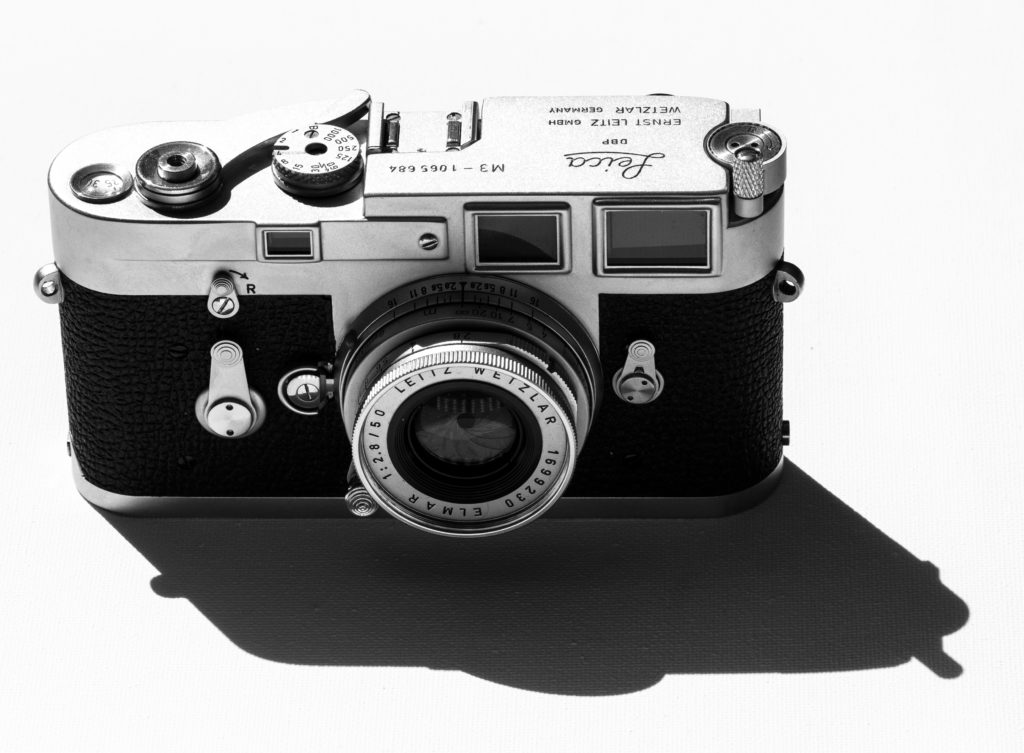
My earliest Leica is an M3. The design retains Leica’s removable baseplate and take-up spool but adds the opening rear flap. The M3’s rewind knob does not rotate during normal film advance. Instead, the centre shaft, marked with red dots, rotates as film is pulled from the film cartridge.
It is an elegant piece of design, and cutched so you won’t suffer from flyback if you let go, but the result is slower winding. I added a third party winder to my M3, which doesn’t much mar its clean lines, and speeds up the rewind considerably.
An Exception – The Nikon F6
There is a caveat. The Nikon F6 manual specifically warns against turning the film rewind crank to reduce film slack as the film leader may come out of position and fail to advance properly.
In any event, the F6 does its own checking. The photographer positions the film leader and closes the camera; the motor performs the initial transport, and if the film is not seated properly, Err and E blink, and the rear screen reads FILM LOAD ERROR. This makes the classic blank-roll, whole film failure considerably harder to achieve, and raises the question of how we got from a tricky bottom load to an automated process with helpful messages.
Conclusion
I have seem videos on YouTube where film loads are performed at great speed with adminrable dexterity, without taking up any slack, and with the rewind knob/crank turning immediately. This leads me to conclude that the cautious practice described here is not for everyone, but it’s stopped me from fretting about taking 36 pictures of nothing rather effectively.
